LadysCalendar wiz(Period)
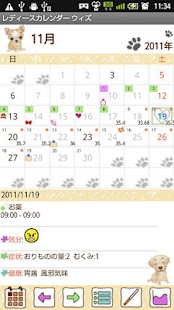
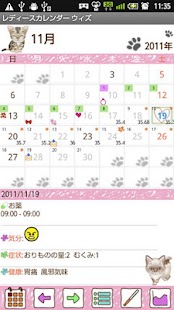
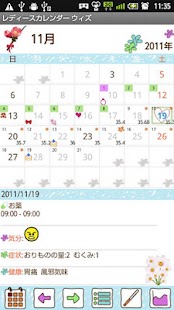
The advertisementmay not be displayed.There are 4 different designs 「Dog」「Cat」「Flower1」「Flower2」and 3 colors.
You can combinedesign and color you like to customize the calendar.Open the Ladys Calendar(not Wiz), press Menu → More → Backup and select Export SDcard to save the data.
Download free version of Ladys Wiz, Menu → Backup → Import LadysCalendar to import your data for Ladys Wiz.
*Base Setting*1.
The initial window is 「Base Setting」.2.
Please select a design and a color, set your menstrual cycle, period and day of ovulation.3.
If you have irregular cycle, please check the checkbox so that it will calculate the cycle the average of past 3 times data.
Press OK, go back to the calendar.4.
Tap the place 「Touch here to register」to save your past menstrual data.
*Calendar's buttons (from the left)*1.「Today」button:Go back to the today's date.2.「Left」&「Right」button:Move the date left to right.3.「List」button:You can see the list of the saved data.4.「Temperature」button:Calculator will pop up.
Enter the temperature.
Press 「Back」button of mobile to save the data.5.「Graph」button:Display each graph of 「Temperature」「Weight」「Blood Pressure」.
*Registration*1.「Menstrual Start」:Check here when your period starts.2.「End」:Check here when your period ends.3.「Sex」:Check here then a heart mark will be displayed on the date.4.「Mood」&「Symptoms」&「Health」buttons:Press each button to select the daily conditions.
Press 「Back」button of the mobile to save the data.5.「Add」button:left-bottom button (plus button) is Add button.
Press here to add your daily plans.6.「Repeat」button:Press right-bottom button to add the repeated plans.7.
When you save the plans, the saved data will be displayed on the List.
*Menu Buttons*1.「Base Setting」:You can edit Base Setting.2.「Password」:Set a password.3.「Mark」:You can add marks on the calendar.4.「Setting Mark」:You can select marks that you only use.5.「Setting」:Customize the calendar.6.「Backup」:Save the date to SD card.
*Daily Plan Edit Window*Buttons from the left1.「Move up」button:You can move up the plan to the previous day.2.「Push back」button:You can move the plan to the next day.3.「Check」:When you have done your plan, then check here so that a red checkmark will be displayed on the calendar.4.「Delete」:Delete the plan.
*Repeated Plans*1.
Press 「Repeat」button of Registration Window.2.
Move to「Alarm List」Window.3.
Press 「New」.4.
Move to 「Alarm Registration」Window.5.「Title」:This title appears on the list of the calendar.6.「Memo」:You can save the memo or diary.7.「Icon」:Selected icon will be displayed on the list of the calendar.
You can add marks from Menu button as well.8.「Date」:When you don't enter Date「To」, the plan will be repeated endlessly.9.「Time」:Set the time.10.「Week」:Select which week has repeat.
All checkboxes should be checked when select a repeat by specified day.11.「Which Week」:Select the week of a repeat.
There are two options.
12.「End of Month」:When you have a repeat at the end of month, check here.
13.「Specified day」:You can select specified days to set a repeat.14.「Month」:Here, you can set a repeat of once a year event.15.
「Alarm」:Set the alarm.16.
When you finish entering all the data, press 「Save」button.17.
You can see saved data on the list of 「Alarm List」.18.
Press 「Back」button of the mobile to go back to the calendar.
About LadysCalendar wiz(Period)
- Package name (App ID)
- info.androidx.lady2calend
- Available on
- Google Play
- Price
- Free
- Version
- v1.1.25
- Developer
- GalleryApp
Looking for the LadysCalendar wiz(Period) APK?
The safest way to get LadysCalendar wiz(Period) (info.androidx.lady2calend) on your Android device is to install it directly from Google Play — you'll always get the latest official version, automatic updates, and no risk of modified or infected APK files from third-party sites.
Gaming Features
Enjoy immersive gaming experience with various game modes.
Weather Features
Get accurate weather forecasts and real-time updates.
Fitness Tracking
Track your workouts and monitor your health metrics.
See LadysCalendar wiz(Period) in Action
Frequently Asked Questions
Is LadysCalendar wiz(Period) free?
Yes, LadysCalendar wiz(Period) is free to download and install on Android through Google Play.
How do I install LadysCalendar wiz(Period) on Android?
Open Google Play on your Android phone or tablet, search for LadysCalendar wiz(Period) by GalleryApp or tap the Google Play button on this page, then tap Install. The app downloads and installs automatically.
What is info.androidx.lady2calend?
info.androidx.lady2calend is the App ID (package name) of LadysCalendar wiz(Period) on Google Play. Every Android app has a unique package name, and it is the safest way to verify you are installing the official app.
Is LadysCalendar wiz(Period) safe to download?
Installing LadysCalendar wiz(Period) from Google Play is the safest option: you get the official version published by GalleryApp, verified by Google Play Protect, with automatic updates. Avoid APK files from unofficial third-party sites.

Get LadysCalendar wiz(Period) Today
LadysCalendar wiz(Period) for Android — free download on Google Play.
Compatible with Android phones and tablets — available on Google Play.
Ask AI about this app
Get instant answers about features, tips and more from popular AI assistants.